.png)
Security
User Permissions - The checkboxes display what the current logged in user can has permission to do in the program.
Change Password - The current logged on user can change his password here.
How to login after installation - Default login : User = admin password = admin
Login - Use this to login as different user.
Administration - This is where the user permissions can be set and users can be added and removed. This is only available to a user that is logged on with Administration permission.
Users - In the Users tab Users can be added and removed. The permissions list contains a fixed list of possible actions the user is able to do. Multiple permissions can be dragged to each user. Instead of associating permissions with users here you may associate permissions with groups in the Groups tab.
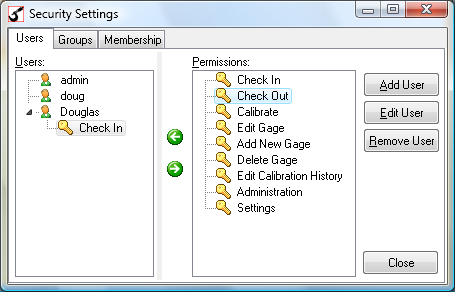
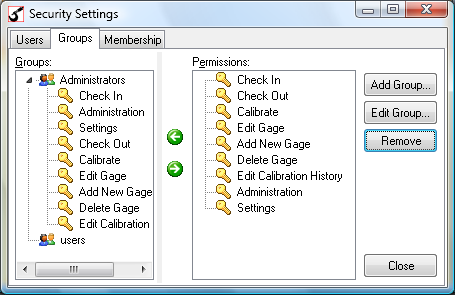
Groups - To simplify user permissions, group names can be added with permissions for that group. Then uses can be added to that group who will all have the permissions of that group. In the Groups tab groups can be added and removed. The permissions list contains a fixed list of possible actions the users in the group is able to do. Multiple permissions can be dragged to each group.
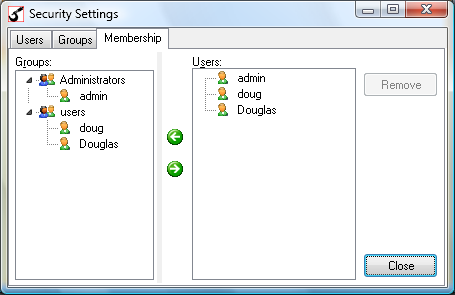
Membership - The membership list allows you to add and remove users to groups. The users will then have the permissions that are set for the group.
If you forget your password - You would have to login with Administration privileges to reset the password.
How to Auto Logon to Gage Control The only way you can automatically login to Gage Control without the login window is to check the "Login with Windows User Name" checkbox on the Settings - Other page and make a user in the Security Settings dialog with the same user name as the Windows user name and a blank password.
if the "Login with Windows User Name" checkbox is checked, then when Gage Control starts up it will look for the currently logged in Windows user name in the Gage Control security users and if it has a blank password (Gage Control user, not Windows), the program will start without asking for login.