Check-Out Gages
If you want to keep track of the gages that are taken out of the tool crib, you can use the Check-In and Check-Out. You can see all the gages that are currently checked out and where they are and what they are used for.
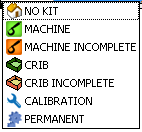
Each gage can be marked with an icon that shows where it is.
How to Check-Out a Gage - On the "Find Gage" page you can mark a gage as checked out by highlighting that row and pressing the "Check Out" button. This will add that gage to the list on the Check-In page.
.png)
On the bottom of the Check Out button you can have more icon choices. See Status Icons