Configure: Directories
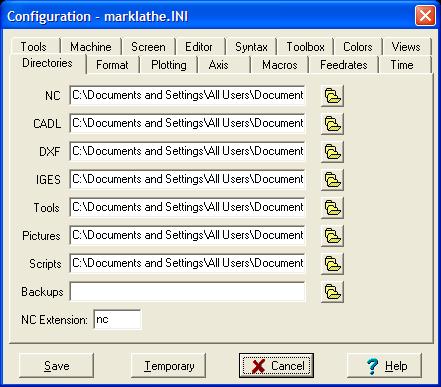
Dialog box displays default directory paths for:
NC Path - default path for NC files.
CDL Path - default path for CADL CAD files.
DXF Path - default path for DXF CAD files.
IGES Path - default path for IGES files.
Tools Path - default path for CADL drawings of tools.
Pictures Path - default path for bitmaps and metafiles. See TPM, TPB, PCDL
Scripts Path - default path for editor scripts and keyboard macros.
Backups Path - default path for backup files made by editor. If a path is entered here the old editor file will be copied here. If blank, backups are saved in same directory as original file with '.bak' extension. See also, Config-Editor
NC extension - default extension for NC files.
Press the File button next to the item to open up the Directory Browser to choose a directory.
These settings are saved to the configuration file when you choose the Save button. You can save them for this session only by choosing the Temporary Button.
_________________________________________________________________
Copyright © 2020 i-Logic Software