Reformat
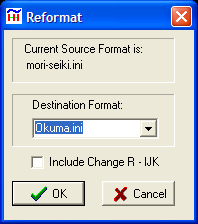
Dialog Box shows Current Format Setting and offers choice of other available format settings for the Destination Format. After pressing OK button, all values in editor will be reformatted according to Destination Format.
The formatting changes made include decimal place format, leading zeros, trailing zeros, radius or diameter for lathes, and arc format.
If there is selected text, only the selected text is reformatted. If no text is selected the formatting begins at the cursor location.
Include Change R - IJK. If this box is checked the I,J,K on G02 and G03 will be changed to R, and vise versa, according to the 'Arc Output' configuration of each format.
Example:Original NC program
N025X16.9678M04
N030Z1.987
N035M08
N040G01X15.6702F.007
N045G00Z2.0684
N050X16.9520
N055Z1.9371
N060G01Z1.9
N065G04P1000
N070M09
N075G00Z9.975
After Reformat:
N025X169678M04
N030Z19870
N035M08
N040G01X156702F0070
N045G00Z20684
N050X169520
N055Z19371
N060G01Z19000
N065G04P1000
N070M09
N075G00Z99750
See also: Set Format
_________________________________________________________________
Copyright © 2020 i-Logic Software