Comp NC
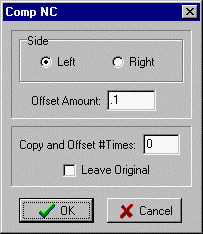
With Comp NC you can highlight a section of text in the editor containing a toolpath and offset the contour evenly all around by the Offset Amount. Set Left or Right to choose the offset direction as it follows the existing toolpath.
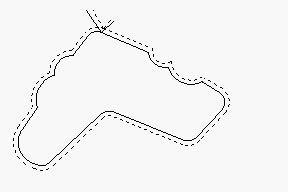
Solid line shows original toolpath in editor. Dotted line shows toolpath after Comp NC.
Contour to offset should have lead in and lead out lines for best results.
Copy and Offset # Times. This feature will offset the highlighted text, duplicate it in the editor, then offset the duplicate text, for a number of times. Each duplicated section will be further offset by the same amount. This has the effect of making several passes, each incremented by the amount. If Leave Original is checked, the first pass will not be offset.
A section of text must be highlighted.
_________________________________________________________________
_________________________________________________________________
Copyright © 2020 i-Logic Software