Keyboard Macro
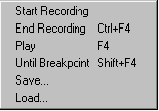
Start Recording – This will clear the buffer and start recording any keystrokes in the edit window.
End Recording – This will end the recording of keystrokes in the edit window. You can now play back the macro.
Play – Every time you click this or press F4, the characters that were recorded in the macro will now be inserted into the editor at the cursor position.
Until Breakpoint – If the keystroke macro goes across more than one line in the editor, Pressing Shift-F4, will continually repeat the macro until the line the cursor goes to contains a breakpoint. With this feature, you can use a macro that changes or inserts characters in a line and goes to the next line and have it repeat itself over a section of the editor text. Just put a breakpoint at the end of the section that you want to run the macro on.
Save – You can save the current keyboard macro to a file so it can be recalled and used later.
Load – This loads a saved keyboard macro file.
You can load several macro files into the Toolbox and have them available for use any time.
_________________________________________________________________
Copyright © 2020 i-Logic Software