Sequence
The Sequence feature will create a numbered list on the toolbar allowing you to jump to different tool sequences in the program. This is helpful for moving around those long programs with lots of tools.
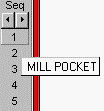
Pressing on 'Seq' will go through the whole program searching for 'TL ' and 'TM ' comment codes and load the tool name and comment information and load it into the buttons below.
Sequence is looking for comments in the form of (TL A :FINISH FACE). The lathe tool file is named 'A.cdl', and a description can optionally be placed after a colon. Each tool comment code needs to be unique because Inplot goes to the first one like it in the program, so if you have two tools with the tool comment code (TM .5) you will have to add the colon and description to make it unique.
The comment will be placed in the popup hint on the numbered buttons. Now when the mouse moves over the numbered buttons, the popup hint will show the description you put in the comment, and a small window on the plot screen will show what the tool looks like (lathe tools only). When you find the tool you are looking for, press the button and the cursor will jump to that tool in the program.
Under 'Seq' are the scroll buttons. When you have more than 10 sequences, pressing the scroll buttons will move forward and back to the next 10.
_________________________________________________________________
Copyright © 2020 i-Logic Software