OLE Server
Inplot is automatically registered with the Windows operating system as an OLE server when it is installed. You are then able to call functions that are built into Inplot from a Visual Basic program.
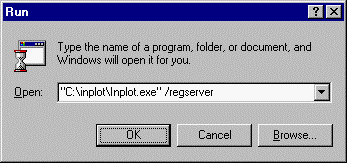
It's also possible to manually register Inplot as an OLE server: Go to the Windows Start menu, select Run, enter path and filename of Inplot, space and “/regserver”. With this parameter, Inplot will not open any window, but will just register itself.
If you ever want to unregister it as an OLE server then do the same thing with “/unregserver” parameter.
Or in Inplot you can go to the Plug-In menu – Install window and choose Server on the menu.
Now a Visual Basic program will be able to find and use the built-in functions of Inplot.
Inplot Functions programmable from Visual Basic.
Methods: see script functions for explanations of most of these.
Add(const Address: String; Value: Double);
AddLine(S: String);'adds string to end of editor
AniSpeed: Integer 'tool animation speed 1..100
Append(Filename:String); 'appends that file to the end of the Inplot editor
Aspace;
Back(NumLines: Integer);
Changev(Address: String; OldValue: Double; NewValue: Double);
Comment;
Copy;
Close; 'closes Inplot
Cut;
Delete;
Delstr(S: String); 'delete from current line
DeleteLine(LineNumber: Integer);
DoCommand(S: String);
'draw temporary line,arc,point
DrawLine(StartX: Double; StartY: Double; StartZ: Double; EndX: Double; EndY: Double;
EndZ: Double; Color: Integer; LineType: Integer);
DrawArc(CenterX: Double; CenterY: Double; CenterZ: Double; Radius: Double;
StartAngle: Double; EndAngle: Double; Color: Integer; LineType: Integer;
View: Integer);
DrawPoint(X: Double; Y: Double; Z: Double; Color: Integer);
DrawTool(x,y,z:double); 'draws current tool at position
Findval(const Address: String; Value: Double);
FindStr(S: String; Comments: WordBool);
FirstVisible(linenumber:integer); 'scrolls editor to put this line at top
Forward(NumLines: Integer);
FormatNum(Address: String; Value: Double):Variant;'returns a string of the value formatted to the current format
Front(S: String);
GetValue(Address:variant) 'returns value of that address at cursor line in editor
GetVar(ID: Integer): Variant; 'ID -1=script pathname, -4=comment character, 1..699=NC program vars
GetLine(LineNumber: Integer): String;
GoBlock(BlockNumber: Integer);
Home;
Input(Address: String); 'like pressing input buttons. (X,Y,Z,XY,XZ)
Insert(S: String);
InsertAfter(S: String); 'inserts string after current line
CurrentLineString: SDouble 'values of items in current processed block
LoadNC(FileName: String);
LoadCad(FileName: String);
LoadTool(FileName: String);'CDL filename of tool picture
LoadMillTool(S:String); 'a mill tool description like on the comment codes
'create CAD element Arc,Line,Point
MakeArc(CenterX,CenterY,CenterZ,Radius,StartAngle,EndAngle:Double; Color, LineStyle, Layer, Plane: Integer);
MakeLine(StartX,StartY,StartZ,EndX,EndY,EndZ:Double; Color,LineStyle,Layer:Integer);
MakePoint(X,Y,Z:Double; Color,Layer:Integer);
Merge(FileName: String);
Message(S: String);
OrderNC(DS: String; Options: Integer);
Paste;
Plot(S: String);
PlotSelect(LineNumber: Integer); 'selects the line like when you press plot button
Prompt(S: String);'displays text in prompt area
Rblank;
Rear(S: String);
Reformat(From: Integer; To_: Integer);
Redraw;
Remove(Address: String; Confirm: WordBool);
Renumber(StartBlock: Integer; Increment: Integer; Address: String;
Existing: WordBool; Comments: WordBool);
Replace(OldString: String; NewString: String; Comments:WordBool);
ReplaceSelection(S: String);
RepSel(S: String);
Reverse;
Rspace;
RotateNC(Angle: Double; Axis: String); 'axis= 'A','B',or'C'
Scale(Address: String; Times: Double);
SaveNC(Filename:string) 'saves the editor to this name
ScriptLoad(Filename:string);'Loads the script into the Inplot script player
ScriptReset; 'like pressing the reset button on the Inplot script window
ScriptRun; 'runs inplot script
SelectLine(LineNumber: Integer);
SelectAll; 'selects all text in editor
Step;'will plot next line in the editor – same as press the step button.
Select (StartLine: Integer; EndLine: Integer);
SetLine(LineNumber: Integer; S: String); 'changes that line to this string
ShiftNC(Address: String; Value: Double);
StopAction; 'ends all active commands
Switch(Address1: String; Address2: String; Reverse1: WordBool;
Reverse2: WordBool);
Uncomment;
Unformat(Address: String; NumString: String): Double; 'returns number according to current format
Properties:
Abort: WordBool 'true stops all Inplot processing
Animation: WordBool 'on or off, true or false
CurrentLineString: String 'string of current line. Read only
CursorLine: Integer 'line in editor the cursor is on.read only. Move the Cursor with SelectLine
EditWindow: Integer 'current edit window 1 or 2
EndSelection: Integer 'line number of end of selection
FeedColor:Integer; 'plot color of normal feed
FirstVisible: Integer 'line number of top visible line in edit window
GetVersion: Variant 'returns Inplot version number
InputPoint: Variant(3) 'Variant array of three doubles (x,y,z of the input point buttons)
LastLineNumber: Integer 'read only
LineLength: Integer 'number of characters in current line. Read only
NCFilename: Variant 'current filename for editor
NCExtension: Variant 'default NC file extension in Inplot
NCPathname: Variant 'current NC file path
PlotWidth: Double 'plot window scaled to this many inches wide
PlotView: Integer 'top,front,side,iso view 1..4
ROutput: Boolean 'whether to use R instead of I,J,K in arcs
StartSelection: Integer 'line number of start of selection
SystemType: Integer 'system type is lathe of mill
Toolnose: Variant(5) 'Variant array of five doubles.(x,z,r,angle,width)
Turret: Integer 'current turret 1 or 2
XRadius: Boolean 'whether Lathe X is radius or diameter
XCoord: Double 'value in the insert X button
YCoord: Double 'value in the insert Y button
ZCoord: Double 'value in the insert Z button
CurrentBlock[Param2: Integer]: Double 'values of items in current processed block
Param2=1=G code, 2=last G code, 3=M code, 4=from X, 5=from Y, 6=from Z, 7=to X, 8=to Y, 9=to Z, 10=from A, 11=from B, 12=from C, 13=to A, 14=to B, 15=to C, 16=I value, 17=J value, 18=K value, 19=feedrate, 20=start angle, 21=end angle, 22=sub level, 23=path radius, 24=block time, 25=D value, 26=S value, 27=L value, 28=U value, 29=W value, 30=E value, 31=P value, 32=Q value, 33=R value, 34=last tool number, 35=tool number
Visual Basic example program:
Dim inp As Object ' Define variable used to hold the application object
Private Sub Form_Load()
' This will attach to current Inplot session or start up new session.
Set inp = CreateObject("inplot.inplotx")
If inp Is Nothing Then
MsgBox ("Can't Link to Inplot")
Unload Form1
End If
End Sub
Private Sub SendFile_Click()
inp.selectall
inp.Delete 'delete text in editor
CommonDialog1.ShowOpen
inp.loadnc CommonDialog1.filename 'Load file in Inplot editor
End Sub
See Examples at web site www.i-logic.com
See Also: ActiveX Pre-Process
_________________________________________________________________
Copyright © 2020 i-Logic Software