Tool Nose Info
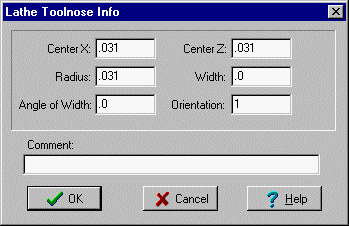
Tool Nose Info
Enter Lathe tool nose information. This dialog box shows up when you pick 'Save Tool' on the CAD-File menu. These are only used to obtain toolpaths from the CAM functions and for Crash Check.
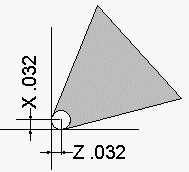
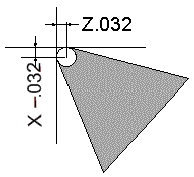
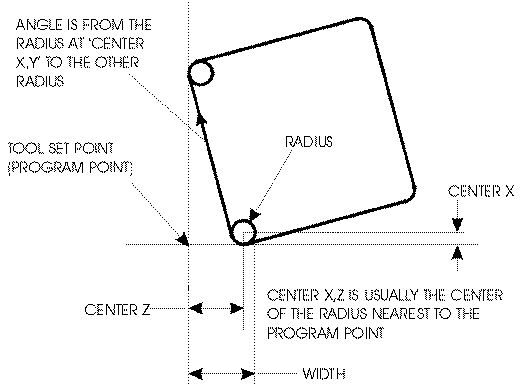
Center X and Center Z are the incremental distance from the programmed point to the center of the radius. (Don't use X Diameter, just the straight incremental distance) In this example, the insert is set in this position. The radius is .032, so enter .032 in center X and .032 in center Z.
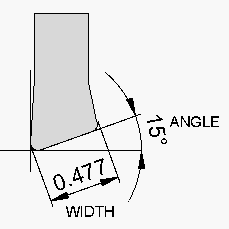
Width - The tool insert can have a width. Grooving and other inserts that can cut with both sides can be used in Inplot. If you enter the width from the outside edges (both corners need the same radius), and the angle from one to the other. Inplot can put the tool tangent either side, just by picking either side of the line. To adjust how the tool goes tangent to the element, see Tool Tangent.
Angle - If the tool has a width, enter the angle going from the side of the radius that you entered to the other side of the width.
Example for Square Insert:
Choosing the Center Radius will depend on which radius you need to be tangent to the part.
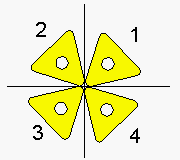
ORIENTATION
Enter the number of the quadrant that the tool is set and used in.
See Also: Tool Tangent
_________________________________________________________________
Copyright © 2020 i-Logic Software