Insert CAM Buttons
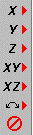
These buttons are used for inserting the position values obtained with CAM functions.
After moving the tool to the desired position, press one of these buttons to insert that address value in the line at the cursor position in the editor.
If there is already that address on that line the value is replaced with the new value. Otherwise, that address is added to the end of the line.
Auto-Insert Button - This button toggles on and off the automatic insertion of X,Y points when you Pick a point with any of the CAM buttons. For instance, You could select the Point CAM button and the Center Pick button and then continuously pick the circles that you want to drill and the center coordinates will be automatically inserted in the editor one after another.
Right Mouse Shortcuts - Normally, when you press on the Insert CAM button it changes the value on the current line and the cursor stays on the same line. But if you click with the right mouse button instead, it will change the value on the line and then insert a blank line after and put the cursor there.
Holding down the Alt key while clicking on the X,Y,Z buttons (either Right or Left) will add a G01 to the front of the line when it inserts and insert a blank line after it.
Right clicking on the Auto-Insert button will just insert a blank line below the current line and put the cursor there.
Tip: If you plot a line or arc with interpolation on, the coordinates of the tool will be updated into the XYZ buttons. So you could interpolation plot along an arc or line and somewhere in the middle of it you cand press the stop button or ESC key to stop it and those coordinates would be stored in the XYZ buttons. Then you could change the endpoint of that line in the program by pressing the XYZ buttons.
See Also: .gif) Insert Arc Button
Insert Arc Button
The bottom button is the Edit–Undo button.
_________________________________________________________________
Copyright © 2020 i-Logic Software