Print Columns
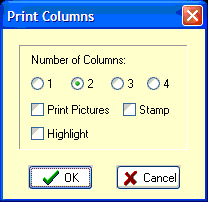
The file can be printed in 1,2,3, or 4 columns on a page with the text and pictures scaled to fit. 4 columns prints tiny but is handy for checking or reference.
Check number of columns on Dialog Box.
If Print Pictures is checked, lathe tools will be printed on the same page wherever there is a 'TL' comment code. Also the PCDL, TPB, TPI, TPM comment codes will print pictures of files on the page. See PRINT TOOLS
if Stamp is checked it will print in big letters on the background of the page, whatever string is in Configure-Tools.
If Highlight is checked, a color printer will highlight the comments in yellow.
If a portion of the file is selected then only that selection will be printed, otherwise, the entire file is sent.
Left Margin on printing is controlled by 'PrintMargin' in Machine INI file.
Number of columns on startup is set by 'PrintColumns' in Machine INI file.
The three checkboxes retain their settings from the last time.
See also: Printer Setup , Comment Code PCDL
_________________________________________________________________
Copyright © 2020 i-Logic Software