Configure: Tools
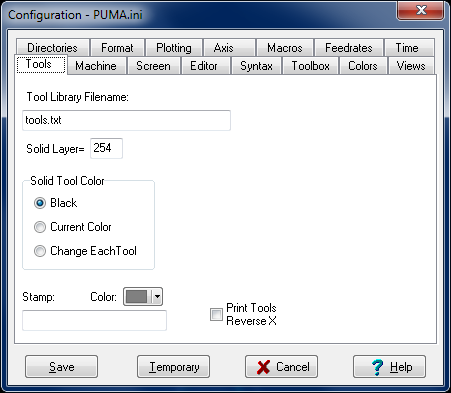
Tool Library Filename
Enter the filename of the tool list file. The default name is 'Tools.Txt'.
This file has to be in the Tools subdirectory.
With this, you are able to have a different tool list file for each machine configuration.
Solid Layer
If you want to change the layer that is used for creating the Solid pictures, enter a different layer number hear. Make sure your solid drawings were drawn on this layer or they won't show up.
Solid Tool Color
When 'Solids' is checked on the Main Menu, the cutting of the tool can be shown either as black or in a color. When 'Change Each Tool' is checked, the color of the tool will change at every 'T' or 'M6' code.
Stamp
This is for printing a big notice on the background of the printed output with Print Columns. This is good for identifying a program for prove-out or development. Use the color change button to get a faint background color. Enter the string to be printed on all the pages here.
Print Tools Reverse X
When printing the tool pictures on the Print Columns utility, the tools will be printed reversed in the X axis.
_________________________________________________________________
Copyright © 2020 i-Logic Software