Print With Tools
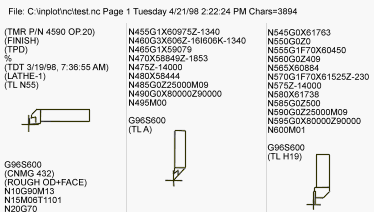
Print W/Tools and Print Columns sends the text in the edit window to the printer and activates ability to add pictures to the printed output.
When there is a Comment code of "(TL filename" ,INPLOT will read the tool file of that name and send it to the printer, printing it on the right hand side of the column.
The file can be printed in 1,2,3, or 4 columns on a page with the text and pictures scaled to fit. 4 columns prints tiny but is handy for checking or reference.
Tool directory path is set in the Set Directories menu item.
If a portion of the file is selected then only that selection will be printed, otherwise, the entire file is sent.
Orientation of the pictures change according to whether Orientation Horz or Orientation Vert is set.
Printing in progress can be aborted by pressing CANCEL in the dialog box that is displayed during printing.
Also other kinds of pictures and bitmaps can be inserted into the page.
See also: Printer Setup, Print NC, Print Columns, Comment Code PCDL, TPB, TPM
_________________________________________________________________
Copyright © 2020 i-Logic Software