CAM Tool: Arc Intersect
This function is used to output arcs that are not tangent to the line or arc before them.
First pick the intersecting entity on the side you want to be tangent to. Then pick the arc you want to generate on the side you want to be tangent to. Make sure you pick it near the start of the arc. This will put the start coordinates in the X,Y,Z insert buttons and the end coordinates with the I,J,K into the arc insert button.
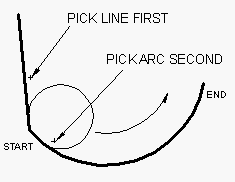
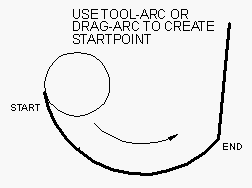
Tool Arc Intersect is only for when the start of the arc is on the non-tangent entity. If the non-tangent entity is on the end of the arc then you will have to use a different technique:
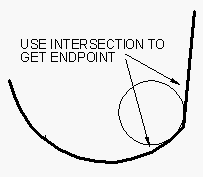
Just output the arc with Tool-Arc or Drag-Arc and you will have the correct start coordinates and correct I,J,K values. Only the end coordinates will be wrong. So use the buttons to insert those lines into the program and then use Tool-Intersection to get the correct end point and insert it into the arc move.
_________________________________________________________________
Copyright © 2020 i-Logic Software