Configure: ToolBox
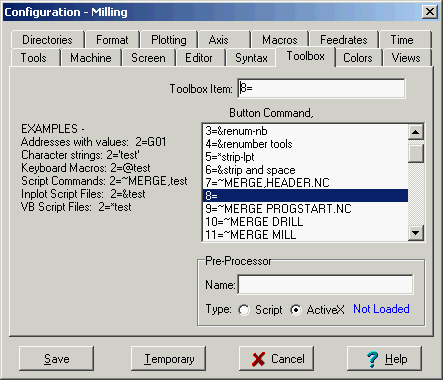
There are several kinds of commands you can enter into the Tool Box buttons.
Addresses with values
An address with a value will be inserted into the line formatted to the current format and placed in order according to the Order String . Ex: 2=G01
Character strings.
Any characters will be inserted at the end of the line when enclosed in single quotes. Ex: 2='test'
Keyboard Macros.
Any Keyboard Macro can be loaded into a button by a command with a '@' character in front of the keyboard macro filename. Ex: 2=@test will run the keyboard macro file 'test.mac'
Script Commands
Any Script Command can be loaded into a button by a Script command with a '~' character in front. Ex: 2=~MERGE,test will merge a file named 'test.nc' at the current cursor location.
Inplot Script Files.
A Script File can run when you press a toolbox button by loading the script filename with the '&' character in front of it. Ex: 2=&test will run the script with the file name 'test.scr'
VB Script Files.
A VB Script File requires the Inscript Plugin program. When Inscript is installed, the script can run when you press a toolbox button. Enter the script filename with the '*' character in front of it. Ex: 2=*test will run the VBScript with the file name 'test.vbs'
Pre-Processor
Name of Inplot script or ActiveX control that will be used as a pre-processor during plotting. If there is a name here, Inplot will attempt to load it. If successful, it will be used for all plotting until a different machine configuration is chosen.
For an Inplot script, enter the file name of the script. The default file extension is '.scr' If there is no file path is given the default script file path is used.
For an ActiveX control, enter the Class ID Name. This is not the filename of the DLL.
For VB Scripts in the Inscript Plug-In the filename must have the '.vbs' extension.
Set the Type buttons to the type of pre-processor.
See also Pre-Processor, ActiveX Pre-Process
_________________________________________________________________
Copyright © 2020 i-Logic Software